
What separates software that works from software that actually survives? Simple — one was tested under real conditions. The other wasn't.
Everything looks fine before launch. Demos run smoothly, staging behaves, the team signs off. Then real users show up. Traffic gets messy, volumes spike beyond what anyone planned for, and suddenly the cracks appear. A checkout flow that handled 50 test users falls apart under 5,000 real ones. A query that ran instantly during development takes 15 seconds against actual production data. Things that worked perfectly just... stop working.
What stings — none of it is shocking in hindsight. These failures show up across every industry, every company size, every tech stack. Same patterns, different victims. It's not bad luck. It's what happens when performance testing gets treated as optional.
Finding problems before your customers do — that's the whole game. And it's a game worth playing. Knowing how to choose the right software testing services company is often what makes the difference between catching these issues early and discovering them the hard way.
That analogy gets used in every client kickoff meeting because it captures the distinction instantly. Functional testing verifies features work. Performance testing verifies features work under real conditions — with thousands of concurrent users, production-scale data volumes, and the unpredictable load patterns actual business generates.
A banking application passed 200 functional tests with perfect scores last month. Every feature behaved exactly as specified. For one user. When 500 concurrent logins hit the authentication system — just 25% of expected daily volume — the entire platform collapsed. Functional testing would never have caught that because functional testing does not ask the question performance testing answers: what happens when the real world shows up?
The business consequences of ignoring this question compound rapidly:
| User Experience Metric | Business Impact |
|---|---|
| Mobile load time exceeds 3 seconds | Users abandon the site entirely |
| Each additional second of page load | E-commerce conversion drops 7% |
| Slow or unresponsive experience | 64% of users switch to a competitor |
These are not theoretical numbers. They represent revenue walking out the door every time performance goes untested.
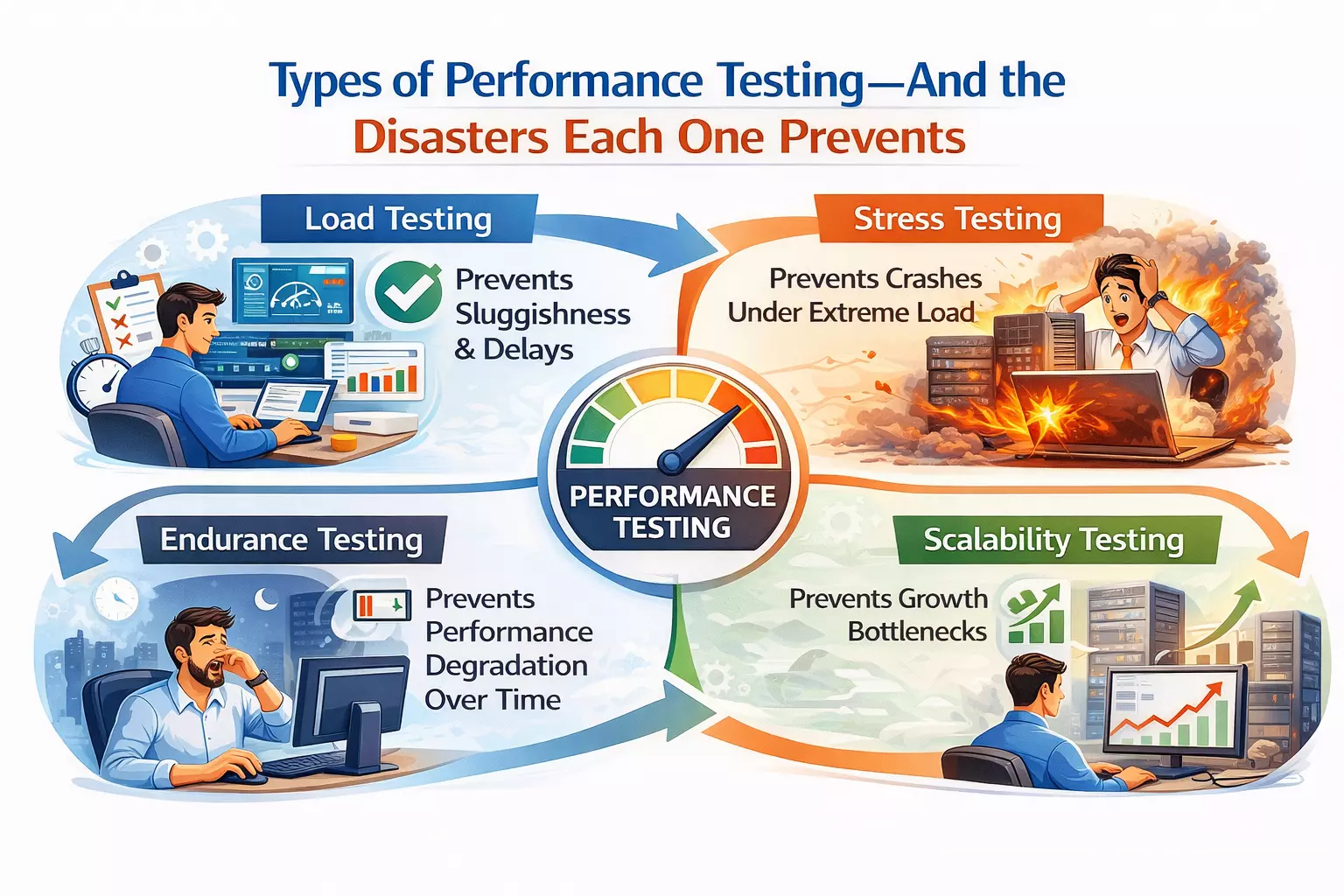
A retail client's inventory system crawled to a halt at just 60% of projected holiday traffic last year. The entire engineering team mobilized for what they assumed was a complex architectural problem.
The actual fix took 20 minutes. Database connection pool limits were set too low — a configuration value nobody checked against production traffic projections. A single load test at realistic volume would have surfaced this before the holiday season.
Load testing validates that your application performs acceptably under expected user volumes. Not peak. Not extreme. Just the traffic you already know is coming. The fact that this basic validation catches critical failures at major companies speaks to how routinely it gets skipped.
A Dallas insurance company called in a panic after a massive hailstorm. Their claims system — the one tool customers desperately needed — was completely unresponsive. Post-mortem analysis revealed a straightforward explanation: the system handled 500 daily claims beautifully because that was "normal." When 1,200 claims poured in after the storm, they had never tested beyond those normal conditions.
Stress testing answers that question deliberately. It pushes systems beyond expected limits to identify where failure occurs, how the system degrades, and whether recovery happens gracefully or catastrophically. The insurance company now runs quarterly stress simulations that exceed their worst-case projections by 300%.
A hospital patient portal ran flawlessly during every demo and testing session. Then it crashed every Sunday. Consistently. Predictably. Infuriatingly.
Weekend-long endurance testing revealed the culprit: memory leaks that accumulated slowly over approximately 2.5 days of continuous operation. Short test sessions never ran long enough to trigger the failure. The system needed to operate continuously for days before the degradation became critical — which is exactly how production environments work and exactly how most testing sessions do not.
Endurance testing catches time-dependent failures that no other testing type surfaces. Resource leaks, gradual performance degradation, storage exhaustion, and connection pool depletion all require sustained operation to manifest.
A media client experienced what every content platform dreams of — a celebrity shared their article to 14 million followers. Traffic jumped 600% in minutes. The site died instantly. Infrastructure auto-scaling — which theoretically handled traffic increases — could not provision resources fast enough for the near-vertical demand curve.
Spike testing simulates exactly these scenarios. Not gradual traffic growth but sudden, explosive demand increases that test whether infrastructure can respond in seconds, not minutes. The media client now runs monthly spike simulations replicating viral traffic patterns. Their system survived the next celebrity mention without a hiccup.
The economics of performance testing timing are brutal and non-negotiable.
Before architecture decisions — A financial company scrapped six months of development when they discovered their microservices architecture created latency making their trading platform unusably slow. Performance modeling before the first line of code would have revealed this. Cost of early detection: a few days of analysis. Cost of late detection: six months of wasted engineering.
During component development — A retail client's search function returned results instantly with 10,000 test products. With their actual catalog of 2 million items, the same search took 12 seconds. Finding this during component testing allowed optimization before integration — when fixing it required changing one module instead of restructuring an entire system.
Before launch — A government benefits system passed every functional test but crumbled under simulated launch-day traffic. Discovering this pre-launch cost a two-week delay. Discovering it post-launch would have cost public trust, political fallout, and the kind of headlines that end careers.
The pattern is consistent: performance defects found early cost 10-100x less to fix than identical defects found in production. Every stage of development where performance testing gets deferred multiplies the eventual cost of remediation.
Fifteen years of investigating performance disasters reveals a surprisingly short list of recurring villains. These same patterns show up in the most common software testing mistakes organizations make — and the damage is almost always avoidable.
Database queries that work in testing and die in production. A banking application's login query took 30 milliseconds with test data — 500 user records. In production, with 3 million records, the same query took 15 seconds. One missing database index turned their dashboard into an unusable crawl during peak hours. The fix took minutes. The investigation took days. Realistic data volumes during testing would have prevented both.
Resource leaks that accumulate silently. A payment processing system opened a new database connection for every transaction but never closed them. Monday through Saturday, usage stayed below connection limits. By Sunday — the busiest day — accumulated unclosed connections hit the ceiling and the system stopped accepting payments entirely. The code fix required changing one line. Finding the root cause consumed three consecutive weekends of monitoring.
Synchronous operations that create invisible gridlock. A travel booking platform waited for credit check completion before proceeding with each reservation — 3 seconds per booking. One user experienced no delay. Two hundred concurrent users created total gridlock as each booking waited in line behind every other. Converting to asynchronous processing eliminated the bottleneck entirely. The vacation season that previously crashed the site became their most profitable quarter.
Third-party dependencies that throttle without warning. A major retailer's site timed out during their biggest annual promotion despite having abundant internal capacity. Hours of investigation revealed their payment processor was throttling transactions at 60 per second — they were attempting 200. No amount of internal optimization could fix an external bottleneck nobody knew existed. Performance testing with realistic transaction volumes through actual third-party integrations would have exposed this weeks before the promotion.
Infrastructure configuration that nobody validated against production projections. Connection pool limits, thread counts, memory allocations, timeout values — settings that work perfectly during development with five concurrent users and fail immediately with five thousand. These are the cheapest problems to fix and the most common to miss because they require testing at scale, not just testing for correctness.
Vague requirements produce vague results. "The system should be fast" is not a testable requirement. This is:
"Checkout completes in under 2 seconds for 95% of users during peak load of 10,000 concurrent sessions with a full product catalog of 500,000 items."
That gives testing teams concrete targets, measurable thresholds, and pass/fail criteria that connect directly to business outcomes. Every performance testing engagement should begin with translating business expectations into specific, measurable requirements — because untestable goals produce untestable systems.
Randomly hitting endpoints at high volume is not performance testing. It is load generation — and it misses nearly everything that matters about how real users behave.
Actual users search, browse, add items to carts, reconsider, remove items, continue browsing, and occasionally complete purchases. They pause between actions. They open multiple tabs. They abandon sessions and return hours later. Effective software testing services replicate these behavioral patterns because application performance under realistic usage differs dramatically from performance under synthetic uniform load. Building this capability into your team often requires specialized skills that are harder to hire for than most organizations expect.
Small datasets hide enormous problems. A reporting system generated results instantly with 5,000 test records. With the actual production dataset of 50 million records, the same report took 45 minutes. The code was identical. The data volume made it unusable.
Performance testing environments must contain data volumes comparable to production — or performance results are fiction.
During a recent engagement, response times doubled mysteriously at 4,000 concurrent users. Application metrics looked healthy. Server resources showed comfortable headroom. Database performance was nominal.
The culprit was a third-party identity verification service quietly throttling requests once the testing volume exceeded their rate limits. Only comprehensive monitoring across every component in the request path — internal and external — revealed the actual bottleneck.
If monitoring does not cover every system a user request touches, performance testing has blind spots that will become production incidents.
| Tool | Strength | Best For |
|---|---|---|
| JMeter | Open-source, extensible, large community | API and web application load testing on a budget |
| Gatling | Developer-friendly, code-based scenarios | Teams wanting performance tests in CI/CD pipelines |
| k6 | Modern scripting, cloud execution | Cloud-native applications and developer-led testing |
| LoadRunner | Enterprise features, protocol coverage | Complex enterprise environments with diverse technology stacks |
| Locust | Python-based, distributed testing | Teams with Python expertise wanting customizable load generation |
| NeoLoad | Low-code design, enterprise reporting | Organizations wanting rapid test creation without deep scripting expertise |
Tool selection should follow strategy and requirements — not marketing material. A startup running a single web application needs different tooling than an enterprise managing 50 microservices across three cloud providers. Understanding how AI is reshaping test automation and tool selection is increasingly relevant as these toolchains evolve.
As teams mature their testing practice, integrating performance tests into manual vs automated testing workflows helps determine which checks run continuously in CI/CD and which require dedicated test cycles.
| Performance Testing Investment | Typical Cost |
|---|---|
| Load testing per cycle | $2,000 - $8,000 |
| Comprehensive performance test suite | $15,000 - $50,000 |
| Ongoing performance monitoring | $5,000 - $20,000 annually |
| Performance engineering engagement | $25,000 - $100,000 |
| Performance Failure Impact | Typical Cost |
|---|---|
| One hour of e-commerce downtime | $10,000 - $500,000+ |
| Customer trust recovery after public outage | Months to years |
| Emergency incident response and remediation | 5-10x the cost of proactive testing |
| Average annual cost per organization | $4.35 million |
The math is not subtle. Organizations spending $50,000 on comprehensive performance testing prevent failures that routinely cost millions. The ROI calculation is among the most straightforward in all of software engineering.
Performance testing is the discipline that separates software that works in demos from software that survives contact with real users, real data volumes, and real-world unpredictability. The $2.7 million Black Friday failure, the insurance system that crashed during the hailstorm, the hospital portal that died every Sunday — every one of these disasters was preventable through testing that the organizations considered optional until the cost of skipping it became undeniable.
The four essential testing types — load, stress, endurance, and spike — each catch failure categories the others miss. Timing matters enormously because performance defects found during architecture planning cost days to resolve while identical defects found in production cost months and millions. The root causes repeat with remarkable consistency — database bottlenecks, resource leaks, synchronous gridlock, third-party throttling, and configuration values nobody validated at scale.
Effective performance testing requires specific measurable requirements, realistic user behavior scenarios, production-scale data volumes, and comprehensive monitoring across every component in the request path. Organizations investing in this discipline proactively spend thousands to prevent failures that cost millions. AD Infosystem delivers performance testing services built around these principles — identifying breaking points before users discover them and ensuring applications perform reliably when the real world arrives. Contact us to discuss your application's performance testing needs before your next launch.